Filament 4/5: Build a Table from an External API Without Eloquent Models
2026-03-28 Filament v4/5You have a REST API full of data you need to display in a Filament panel. No database table, no Eloquent model - just JSON from an external service. Before Filament v4, this was painful. You'd hack together a custom Livewire component or create fake models. Now, records() makes it straightforward.
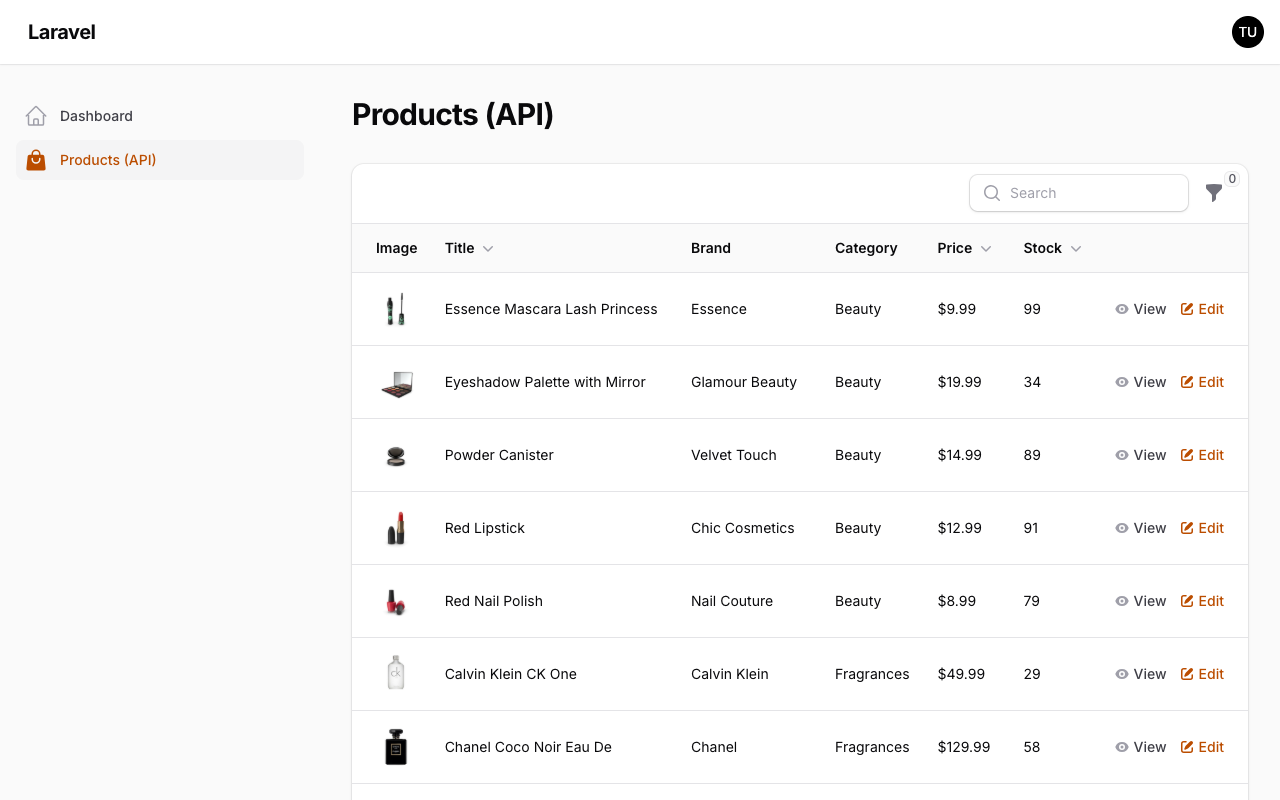
Here's what we're building: a product table powered entirely by the DummyJSON API, complete with search, pagination, filters, an edit action that PUTs back to the API, and a view action with a modal detail view.
The Page Setup
First, create a custom Filament page. We don't need a resource since there's no model.
php artisan make:filament-page ListProducts --no-interactionThis gives you a page class. We need to add the HasTable trait so it can render a table.
app/Filament/Pages/ListProducts.php
<?php namespace App\Filament\Pages; use Filament\Actions\Action;use Filament\Forms\Components\Select;use Filament\Forms\Components\TextInput;use Filament\Notifications\Notification;use Filament\Pages\Page;use Filament\Support\Icons\Heroicon;use Filament\Tables\Columns\ImageColumn;use Filament\Tables\Columns\TextColumn;use Filament\Tables\Concerns\InteractsWithTable;use Filament\Tables\Contracts\HasTable;use Filament\Tables\Filters\SelectFilter;use Filament\Tables\Table;use Illuminate\Pagination\LengthAwarePaginator;use Illuminate\Support\Collection;use Illuminate\Support\Facades\Http;use Illuminate\Support\Str; class ListProducts extends Page implements HasTable{ use InteractsWithTable; protected static ?string $navigationIcon = 'heroicon-o-shopping-bag'; protected static string $view = 'filament.pages.list-products'; protected static ?string $title = 'Products (API)'; public function table(Table $table): Table { $baseUrl = 'https://dummyjson.com'; return $table ->records(function ( ?string $search, array $filters, ?string $sortColumn, ?string $sortDirection, int $page, int $recordsPerPage, ) use ($baseUrl): LengthAwarePaginator { $category = $filters['category']['value'] ?? null; $endpoint = match (true) { filled($search) => 'products/search', filled($category) => "products/category/{$category}", default => 'products', }; $skip = ($page - 1) * $recordsPerPage; $params = [ 'limit' => $recordsPerPage, 'skip' => $skip, 'select' => 'id,title,brand,category,thumbnail,price,stock', ]; if (filled($search)) { $params['q'] = $search; } if ($sortColumn && $endpoint === 'products') { $params['sortBy'] = $sortColumn; $params['order'] = $sortDirection ?? 'asc'; } $response = Http::baseUrl($baseUrl) ->get($endpoint, $params) ->collect(); return new LengthAwarePaginator( items: $response['products'], total: $response['total'], perPage: $recordsPerPage, currentPage: $page, ); }) ->columns([ ImageColumn::make('thumbnail') ->label('Image') ->circular(), TextColumn::make('title') ->sortable() ->searchable(), TextColumn::make('brand') ->state(fn (array $record): string => Str::title($record['brand'] ?? 'Unknown')), TextColumn::make('category') ->formatStateUsing(fn (string $state): string => Str::headline($state)), TextColumn::make('price') ->money() ->sortable(), TextColumn::make('stock') ->sortable(), ]) ->filters([ SelectFilter::make('category') ->options(fn (): Collection => Http::get("{$baseUrl}/products/categories") ->collect() ->pluck('name', 'slug') ), ]) ->searchable() ->recordActions([ Action::make('view') ->icon(Heroicon::Eye) ->color('gray') ->modalHeading(fn (array $record): string => $record['title']) ->modalSubmitAction(false) ->modalCancelActionLabel('Close') ->schema([ \Filament\Infolists\Components\TextEntry::make('title'), \Filament\Infolists\Components\TextEntry::make('brand'), \Filament\Infolists\Components\TextEntry::make('category'), \Filament\Infolists\Components\TextEntry::make('price') ->money(), \Filament\Infolists\Components\TextEntry::make('stock'), ]) ->fillForm(fn (array $record): array => $record), Action::make('edit') ->icon(Heroicon::PencilSquare) ->modalHeading('Edit product') ->fillForm(fn (array $record): array => $record) ->schema([ TextInput::make('title') ->required(), Select::make('category') ->options(fn (): Collection => Http::get("{$baseUrl}/products/categories") ->collect() ->pluck('name', 'slug') ) ->required(), ]) ->action(function (array $data, array $record) use ($baseUrl) { $response = Http::put("{$baseUrl}/products/{$record['id']}", [ 'title' => $data['title'], 'category' => $data['category'], ]); if ($response->failed()) { Notification::make() ->title('Failed to update product') ->danger() ->send(); return; } $this->resetTable(); Notification::make() ->title('Product updated') ->success() ->send(); }), ]); }}That's the entire page. No model, no migration, no factory. Just a class that talks to an API.
How records() Works
The records() method accepts a closure. Filament automatically injects these parameters based on the current table state:
?string $search— the current search queryarray $filters— active filter values?string $sortColumn/?string $sortDirection— current sort stateint $page/int $recordsPerPage— pagination state
You return either an array, a Collection, or a LengthAwarePaginator. For API data, LengthAwarePaginator is the right choice — it tells Filament the total record count so pagination renders correctly.
Each record is a plain associative array. The array keys in records() must match the column names you define in columns().
Columns with Array Records
Most columns just work — TextColumn::make('title') reads $record['title'] automatically. But when you need computed values, use state():
TextColumn::make('brand') ->state(fn (array $record): string => Str::title($record['brand'] ?? 'Unknown')),Notice the type hint is array, not a Model class. This is the key difference from Eloquent-backed tables.
Actions That POST Back to the API
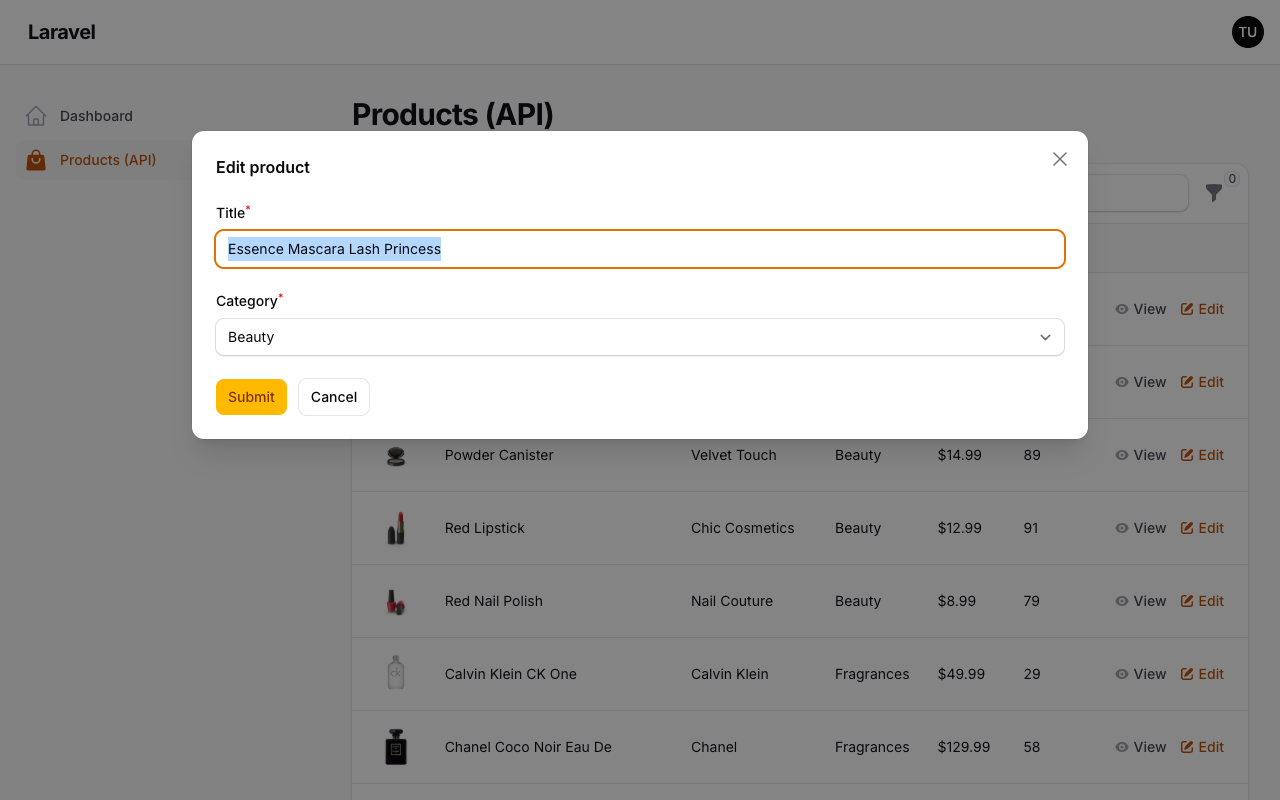
The edit action uses fillForm() to pre-populate modal fields from the array record, then sends a PUT request in the action() callback:
Action::make('edit') ->fillForm(fn (array $record): array => $record) ->schema([ TextInput::make('title')->required(), Select::make('category')->options(/* ... */)->required(), ]) ->action(function (array $data, array $record) use ($baseUrl) { Http::put("{$baseUrl}/products/{$record['id']}", $data); }),Two things to note:
fillForm()receives the raw array and maps keys to form field names — the field names must match the array keys- In the
action()callback,$recordis anarray(not a Model), and$dataholds the submitted form values
One important Filament detail: with custom data, the table does not automatically refresh after an action changes a record. If your action updates data visible on the current page, call $this->resetTable() after a successful API request.
The view action works similarly but uses modalSubmitAction(false) to hide the submit button — it's read-only.
The View File
The Blade view is minimal since the table renders itself:
resources/views/filament/pages/list-products.blade.php
<x-filament-panels::page> {{ $this->table }}</x-filament-panels::page>Gotchas
Search and filters are mutually exclusive in this setup. The DummyJSON API doesn't support combining search with category filtering in a single request. The match block prioritizes search over filters. Your real API might handle this differently — adjust the endpoint logic accordingly.
Sorting only works on the default endpoint. DummyJSON doesn't support sortBy on search or category endpoints. The code only passes sort params when hitting the base /products endpoint. This is an API limitation, not a Filament one.
Bulk actions need stable record keys. If your records don't have a consistent unique key, Filament can't reliably track selections. In simple cases, an id field or stable array key is enough. If you want bulk actions to work across multiple pagination pages, also implement Filament's resolveSelectedRecordsUsing() method.
You could extend this pattern with caching (Cache::remember() around the HTTP calls), retry logic on the HTTP client, or even websocket-driven refresh. The table doesn't care where the data comes from — it just needs an array.
A few of our Premium Examples: