Filament Actions: Dynamic Badges on Buttons with "State" Colors
2026-04-03 Filament v4/5On buttons/actions in Filament, you can add a badge that shows a count and changes color based on the current state, like turning red when things pile up.
Filament's badge() and badgeColor() methods support closures with full utility injection, so you can build exactly that.
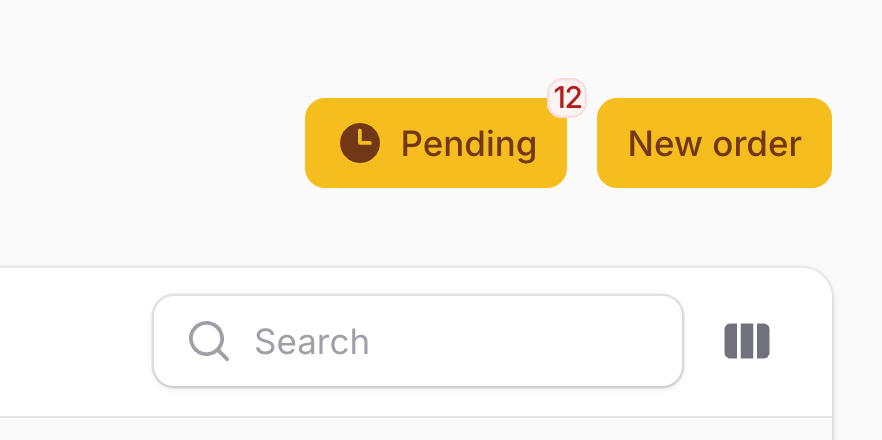
Here's what the end result looks like:
Static Badge First
The simplest version is a static badge with a fixed color. This is fine if you just need a constant indicator:
use Filament\Actions\Action; Action::make('filter') ->iconButton() ->icon('heroicon-m-funnel') ->badge(5) ->badgeColor('success')This puts a green "5" on the corner of the button. But it never changes. Not very useful in a real app.
Making the Badge Dynamic
Both badge() and badgeColor() accept closures. You can inject any of Filament's utility parameters into those closures, which is where the real power is.
Say you have a pending orders action on a List page. You want the badge to show the count of pending orders, and the color to shift based on how many are waiting.
app/Filament/Resources/OrderResource/Pages/ListOrders.php
use App\Models\Order;use Filament\Actions\Action; protected function getHeaderActions(): array{ return [ Action::make('pendingOrders') ->label('Pending') ->icon('heroicon-m-clock') ->badge(function (): int { return Order::where('status', 'pending')->count(); }) ->badgeColor(function (): string { $count = Order::where('status', 'pending')->count(); return match (true) { $count >= 10 => 'danger', $count >= 5 => 'warning', $count > 0 => 'info', default => 'gray', }; }) ->url(fn (): string => static::getUrl(['tableFilters' => ['status' => ['value' => 'pending']]])), ];}The badge count updates on every page load. When there are 10+ pending orders, the badge turns red. Between 5 and 9, it's yellow. Below that, it stays a calm blue.
Badge in Table Row Actions
The closures inside badge() and badgeColor() aren't limited to simple values. When used on table record actions, you can inject $record, $livewire, $table, and other utilities directly as parameters.
Here's a row action that shows how many comments a post has, colored by engagement level.
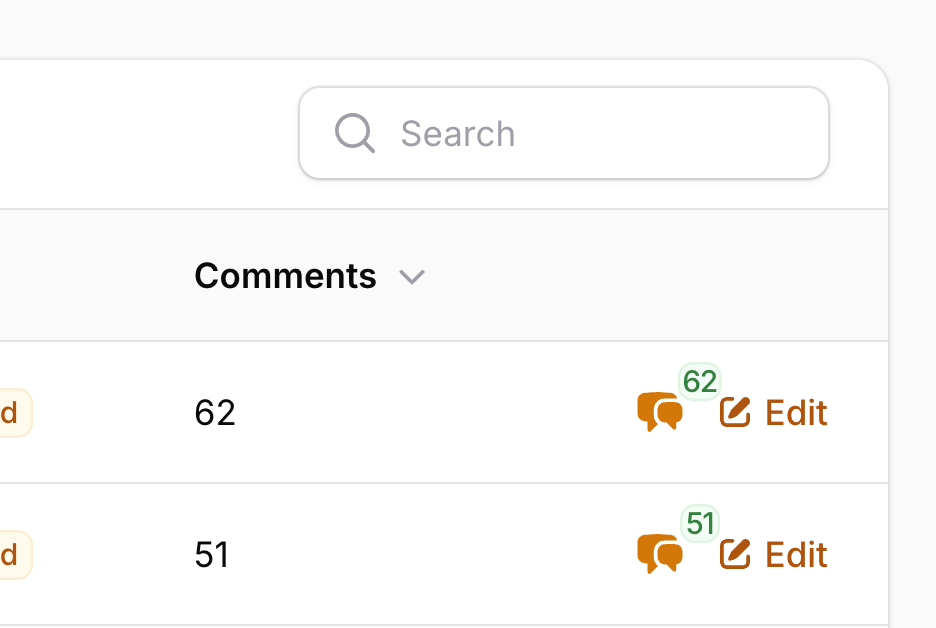
And here's the code:
app/Filament/Resources/Posts/Tables/PostsTable.php
use App\Models\Post;use Filament\Actions\Action;use Filament\Tables\Table; public static function configure(Table $table): Table{ return $table ->columns([ // ... ]) ->recordActions([ Action::make('viewComments') ->icon('heroicon-m-chat-bubble-left-right') ->iconButton() ->badge(fn (Post $record): int => $record->comments_count) ->badgeColor(fn (Post $record): string => match (true) { $record->comments_count >= 50 => 'success', $record->comments_count >= 10 => 'warning', default => 'gray', }) ->url(fn (Post $record): string => route('filament.admin.resources.posts.comments', $record)), ]);}Make sure you eager-load the count in your query to avoid N+1 issues:
public static function table(Table $table): Table{ return $table ->query(Post::query()->withCount('comments')) ->columns([ // ... ]) // ...}Available Utilities in Badge Closures
Most developers only pass simple values to badge() and badgeColor(). But the closure supports the full set of injectable utilities that Filament actions provide:
Post $recordorModel $record- the current Eloquent model (in table row actions)array $arguments- any arguments passed to the actionAction $action- the action instance itselfComponent $livewire- the Livewire component, useful for accessing page state or filtersTable $table- the table instance (when inside a table context)Collection $selectedRecords- the currently selected records (relevant in bulk contexts)
You can combine multiple utilities in a single closure. For example, showing a different badge color when the logged-in user owns the record:
use App\Models\Post;use Livewire\Component as Livewire; Action::make('viewComments') ->iconButton() ->icon('heroicon-m-chat-bubble-left-right') ->badge(fn (Post $record): int => $record->comments_count) ->badgeColor(function (Post $record, Livewire $livewire): string { if ($record->user_id === auth()->id()) { return 'primary'; } return $record->comments_count >= 10 ? 'warning' : 'gray'; })Quick Tip: Badge With/Without Parameters
Don't confuse ->badge(5) (adds a small count indicator to the corner) with ->badge() (changes the entire trigger style to look like a badge). They're different methods with very different results.
// Corner badge with countAction::make('filter')->badge(5) // Badge-style trigger (the whole button looks like a badge)Action::make('status')->badge()If you pass an argument, you get the count indicator. If you call it without arguments, you change the trigger style. Easy to mix up, hard to debug.
A few of our Premium Examples: