Filament UX: Radio vs Select for Dependent Fields
2026-02-25 Filament v4/5Filament's Select is the go-to input for choosing options, especially with dependent fields. But when you only have a few options, a Radio input can be a better choice — all options are visible at a glance. Let me show you how easy it is to switch.
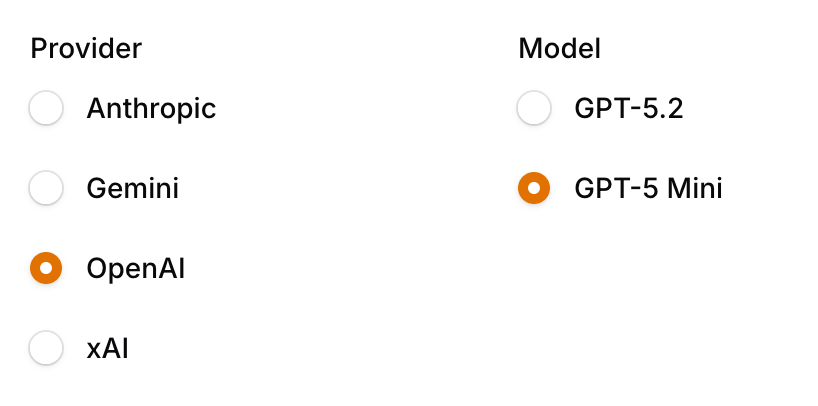
Here's a typical dependent select setup — a provider dropdown controls which models appear:
Grid::make() ->schema([ Select::make('ai_provider') ->label('Provider') ->options([ 'anthropic' => 'Anthropic', 'gemini' => 'Gemini', 'openai' => 'OpenAI', 'xai' => 'xAI', ]) ->default('openai') ->live(), Select::make('ai_model') ->label('Model') ->options(fn (Get $get): array => match ($get('ai_provider') ?? 'openai') { 'openai' => ['gpt-5.2' => 'GPT-5.2', 'gpt-5-mini' => 'GPT-5 Mini'], 'anthropic' => ['claude-opus-4-6' => 'Claude Opus 4.6', 'claude-sonnet-4-6' => 'Claude Sonnet 4.6', 'claude-haiku-4-5-20251001' => 'Claude Haiku 4.5'], 'gemini' => ['gemini-3.1-pro-preview' => 'Gemini 3.1 Pro', 'gemini-3-pro-preview' => 'Gemini 3 Pro', 'gemini-3-flash-preview' => 'Gemini 3 Flash'], 'xai' => ['grok-4-1-fast-reasoning' => 'Grok 4.1 Fast'], default => [], }) ->default('gpt-5-mini'), ]),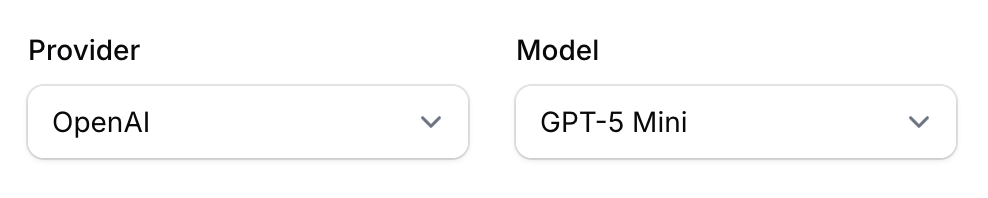
To switch to radio buttons, just replace Select with Radio. The rest of the code stays identical:
Grid::make() ->schema([ Radio::make('ai_provider') ->label('Provider') ->options([ 'anthropic' => 'Anthropic', 'gemini' => 'Gemini', 'openai' => 'OpenAI', 'xai' => 'xAI', ]) ->default('openai') ->live(), Radio::make('ai_model') ->label('Model') ->options(fn (Get $get): array => match ($get('ai_provider') ?? 'openai') { 'openai' => ['gpt-5.2' => 'GPT-5.2', 'gpt-5-mini' => 'GPT-5 Mini'], 'anthropic' => ['claude-opus-4-6' => 'Claude Opus 4.6', 'claude-sonnet-4-6' => 'Claude Sonnet 4.6', 'claude-haiku-4-5-20251001' => 'Claude Haiku 4.5'], 'gemini' => ['gemini-3.1-pro-preview' => 'Gemini 3.1 Pro', 'gemini-3-pro-preview' => 'Gemini 3 Pro', 'gemini-3-flash-preview' => 'Gemini 3 Flash'], 'xai' => ['grok-4-1-fast-reasoning' => 'Grok 4.1 Fast'], default => [], }) ->default('gpt-5-mini'),Now all providers and models are visible immediately — no clicking required.
A few of our Premium Examples: