Filament Slider Field: Star Ratings, Budget Ranges, and Stepped Values
2026-04-14 Filament v4/5Filament v5 ships a native Slider component backed by noUiSlider. Most developers still reach for a TextInput or a third-party package when they need a rating field or a budget range. But the built-in Slider handles all of that with pips, tooltips, multiple handles, and step control.
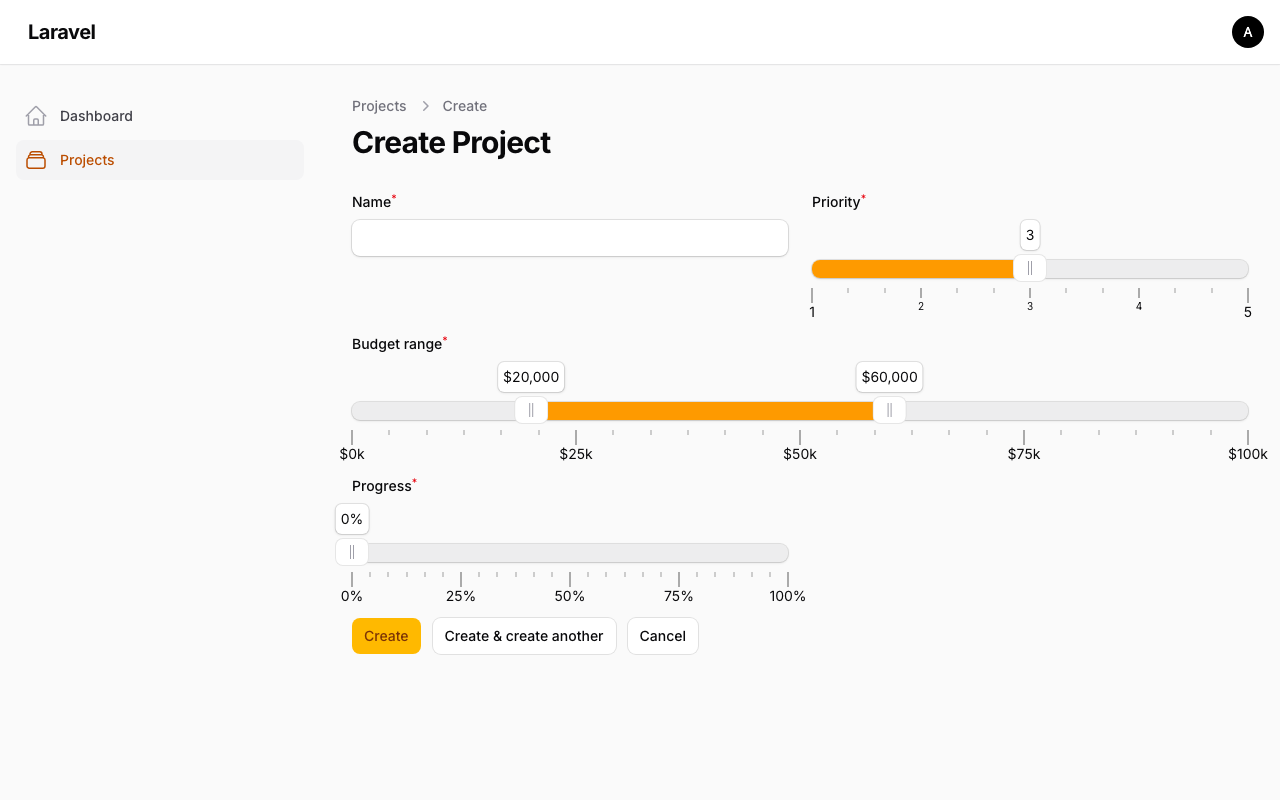
Here are three real-world patterns using a Project model with priority (unsignedTinyInteger), budget_range (JSON cast to array), and progress (unsignedTinyInteger) fields.
Pattern 1: Star Rating with Stepped Pips
A 1-5 priority rating where each step is labeled. Instead of a select dropdown, the slider gives the user a visual, draggable input.
app/Filament/Resources/Projects/Schemas/ProjectForm.php
use Filament\Forms\Components\Slider;use Filament\Forms\Components\Slider\Enums\PipsMode; Slider::make('priority') ->range(minValue: 1, maxValue: 5) ->step(1) ->default(3) ->pips(PipsMode::Steps) ->fillTrack() ->tooltips(),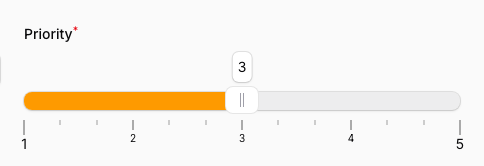
The key methods:
step(1)restricts the handle to whole numbers only.pips(PipsMode::Steps)adds labeled tick marks at every step (1, 2, 3, 4, 5).fillTrack()colors the track from the left edge to the handle, giving a visual sense of "how much".tooltips()shows the current value when hovering over the handle.
Pattern 2: Budget Range with Two Handles
For a min/max budget, you need two draggable handles on a single slider. Set the default() to an array, and Filament gives you two handles automatically.
use Filament\Forms\Components\Slider;use Filament\Forms\Components\Slider\Enums\Behavior;use Filament\Forms\Components\Slider\Enums\PipsMode;use Filament\Support\RawJs; Slider::make('budget_range') ->range(minValue: 0, maxValue: 100000) ->step(5000) ->default([20000, 60000]) ->fillTrack([false, true, false]) ->tooltips(RawJs::make(<<<'JS' `$${Math.round($value).toLocaleString()}` JS)) ->behavior([Behavior::Tap, Behavior::Drag]) ->minDifference(10000) ->pips(PipsMode::Positions, density: 4) ->pipsValues([0, 25, 50, 75, 100]) ->pipsFormatter(RawJs::make(<<<'JS' `$${($value / 1000).toFixed(0)}k` JS)) ->columnSpanFull(),
A few things happening here:
default([20000, 60000])creates two handles. The model'sbudget_rangecolumn must be cast toarray.fillTrack([false, true, false])colors only the section between the two handles. The array has three values: before first handle, between handles, after second handle.tooltips(RawJs::make(...))formats the tooltip as$20,000instead of raw20000. The$valuevariable is available inside the JS expression.behavior([Behavior::Tap, Behavior::Drag])lets users click anywhere on the track to snap the nearest handle, and drag the colored section to move both handles together.minDifference(10000)prevents the handles from getting closer than $10,000 apart.pips(PipsMode::Positions)withpipsValues([0, 25, 50, 75, 100])places labels at quarter intervals ($0k, $25k, $50k, $75k, $100k). UsingPipsMode::Stepshere would create a label for every $5k step, which gets too crowded on narrower screens.columnSpanFull()gives the range slider the full form width since two handles need room to breathe.
Pattern 3: Progress Percentage with Formatted Tooltip
A simple 0-100% slider with a formatted tooltip showing the % sign and step increments of 5.
use Filament\Forms\Components\Slider;use Filament\Forms\Components\Slider\Enums\PipsMode;use Filament\Support\RawJs; Slider::make('progress') ->range(minValue: 0, maxValue: 100) ->step(5) ->default(0) ->fillTrack() ->tooltips(RawJs::make(<<<'JS' `${Math.round($value)}%` JS)) ->pips(PipsMode::Positions, density: 4) ->pipsValues([0, 25, 50, 75, 100]) ->pipsFormatter(RawJs::make(<<<'JS' `${$value}%` JS)),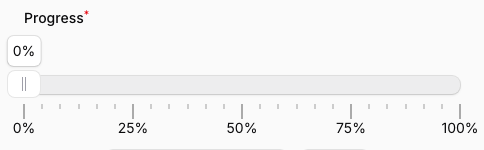
pips(PipsMode::Positions)combined withpipsValues([0, 25, 50, 75, 100])places labeled tick marks at 0%, 25%, 50%, 75%, and 100%. Thedensity: 4adds unlabeled dots between them.- Both
tooltips()andpipsFormatter()accept aRawJsexpression. The$valuevariable holds the current numeric value. step(5)constrains to 5% increments, so you won't get awkward values like37.
Putting It All Together
Here's the complete form schema with all three patterns plus the project name field:
app/Filament/Resources/Projects/Schemas/ProjectForm.php
<?php namespace App\Filament\Resources\Projects\Schemas; use Filament\Forms\Components\Slider;use Filament\Forms\Components\Slider\Enums\Behavior;use Filament\Forms\Components\Slider\Enums\PipsMode;use Filament\Forms\Components\TextInput;use Filament\Schemas\Schema;use Filament\Support\RawJs; class ProjectForm{ public static function configure(Schema $schema): Schema { return $schema ->components([ TextInput::make('name') ->required() ->maxLength(255), Slider::make('priority') ->range(minValue: 1, maxValue: 5) ->step(1) ->default(3) ->pips(PipsMode::Steps) ->fillTrack() ->tooltips(), Slider::make('budget_range') ->range(minValue: 0, maxValue: 100000) ->step(5000) ->default([20000, 60000]) ->fillTrack([false, true, false]) ->tooltips(RawJs::make(<<<'JS' `$${Math.round($value).toLocaleString()}` JS)) ->behavior([Behavior::Tap, Behavior::Drag]) ->minDifference(10000) ->pips(PipsMode::Positions, density: 4) ->pipsValues([0, 25, 50, 75, 100]) ->pipsFormatter(RawJs::make(<<<'JS' `$${($value / 1000).toFixed(0)}k` JS)) ->columnSpanFull(), Slider::make('progress') ->range(minValue: 0, maxValue: 100) ->step(5) ->default(0) ->fillTrack() ->tooltips(RawJs::make(<<<'JS' `${Math.round($value)}%` JS)) ->pips(PipsMode::Positions, density: 4) ->pipsValues([0, 25, 50, 75, 100]) ->pipsFormatter(RawJs::make(<<<'JS' `${$value}%` JS)), ]); }}Each pattern works standalone. You can drop any of these Slider configurations into your own forms without needing the others. The key takeaway: check the native Slider docs before reaching for a package. Between pips(), tooltips(), fillTrack(), and step(), you can handle most numeric input scenarios without any dependencies.
A few of our Premium Examples: