Filament Custom Action: Don't Show Errors in Notifications (use Callouts)
2026-02-26 Filament v4/5Imagine in Filament you have a custom action on an Edit page that opens a modal. After the action button click, where do you show the error message if something goes wrong?
Let's say, you do something risky - an API call, invoice generation, external sync, etc. You wrap it in try/catch, but when it fails…
Bad UX: the error shows up as a Filament notification.
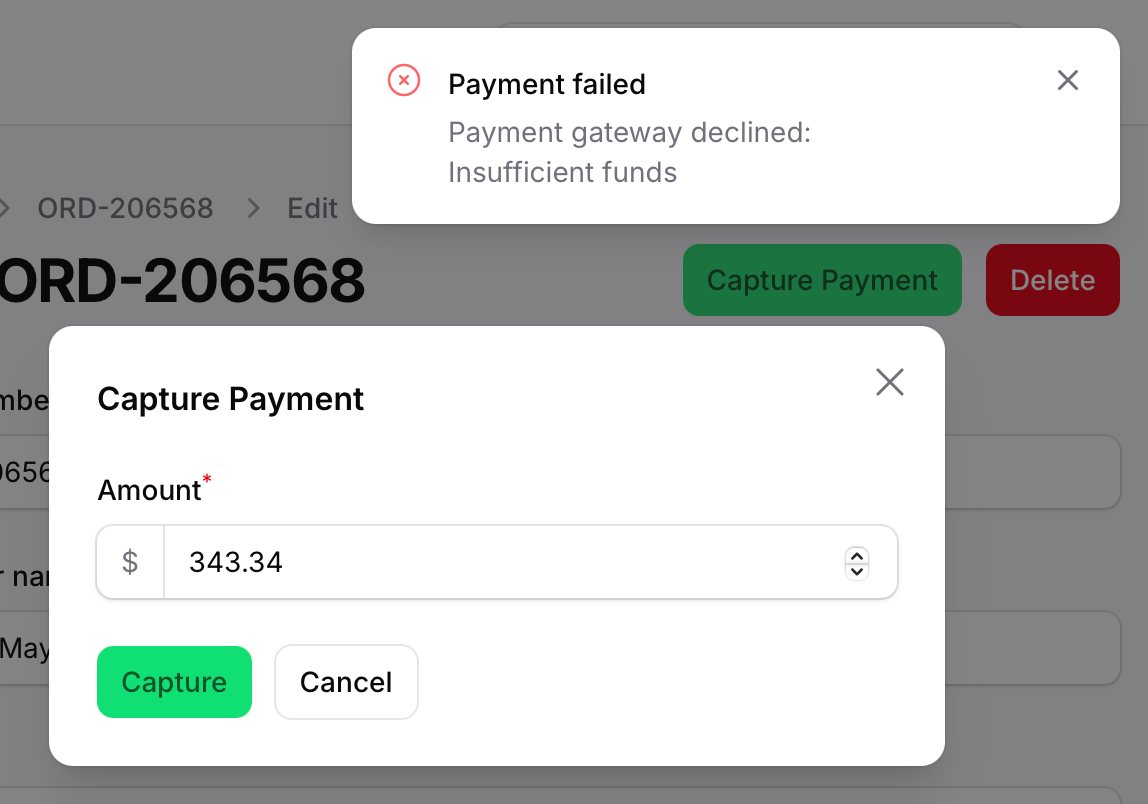
It appears in the corner, auto-disappears after a few seconds, the user might miss it entirely, and the modal closes — losing all context.
Better UX: keep the modal open and show the error inside the modal, right where the user is looking.
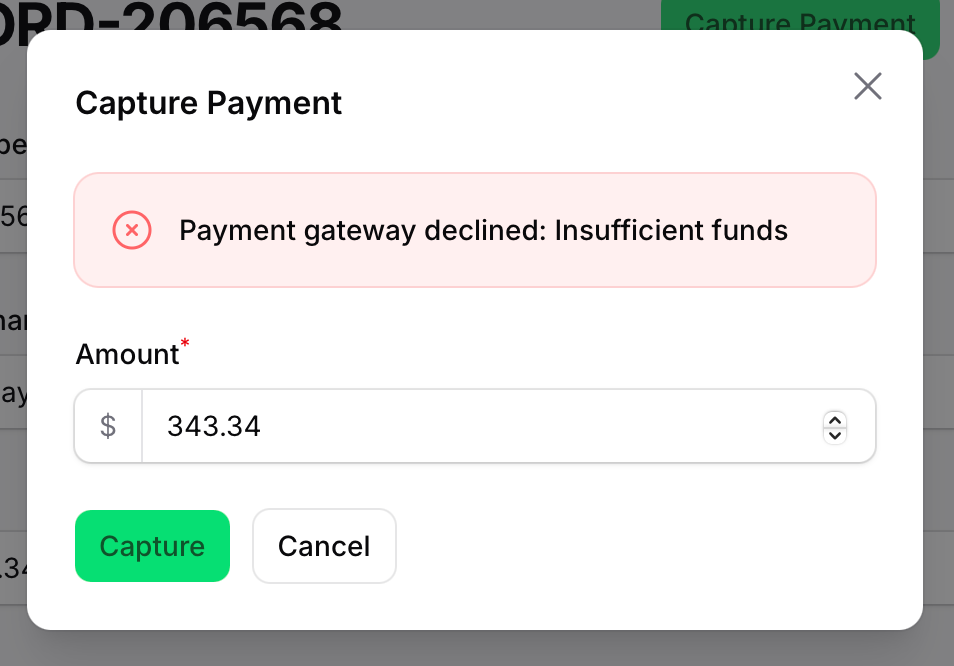
Let me show you how to implement it, with a Callout component.
The Scenario
On an Edit page (e.g. EditOrder), we add an action: "Capture Payment". It opens a modal asking for an amount, then calls a payment service. If the gateway fails, we want to show the error to the user.
The Notification Approach
A typical approach is to catch the exception and send a Filament notification.
use Livewire\Component; Action::make('capturePayment') ->label('Capture Payment') ->modalWidth(Width::Medium) ->modalHeading('Capture Payment') ->modalSubmitActionLabel('Capture') ->color('success') ->fillForm(fn (): array => [ 'amount' => $this->record->amount, ]) ->schema([ TextInput::make('amount') ->label('Amount') ->numeric() ->required() ->minValue(0.01) ->prefix('$'), ]) ->action(function (array $data, Component $livewire): void { try { app(CapturePayment::class) ->handle(order: $this->record, amount: (float) $data['amount']); Notification::make() ->title('Payment captured successfully') ->success() ->send(); } catch (Throwable $e) { Notification::make() ->title('Payment failed') ->body($e->getMessage()) ->danger() ->send(); $action->halt(); } }),This works, but the notification pops up in the top-right corner and disappears after a few seconds.
The Callout Approach
A better approach is to use the Callout schema component. We add a hidden Callout to the modal's schema that only becomes visible when an error occurs. The modal stays open, and the user sees the error message right above the form.
use Livewire\Component;use Filament\Actions\Action;use Filament\Schemas\Components\Callout; Action::make('capturePayment') ->label('Capture Payment') ->modalWidth(Width::Medium) ->modalHeading('Capture Payment') ->modalSubmitActionLabel('Capture') ->color('success') ->fillForm(fn (): array => [ 'amount' => $this->record->amount, ]) ->schema([ Callout::make(fn (Get $get): string => $get('capture_error') ?? '') ->danger() ->visible(fn (Get $get): bool => filled($get('capture_error'))), TextInput::make('amount') ->label('Amount') ->numeric() ->required() ->minValue(0.01) ->prefix('$'), ]) ->action(function (array $data, Action $action, Component $livewire): void { try { app(CapturePayment::class) ->handle(order: $this->record, amount: (float) $data['amount']); Notification::make() ->title('Payment captured successfully') ->success() ->send(); } catch (Throwable $e) { $livewire->mountedActions[$action->getNestingIndex()]['data']['capture_error'] = $e->getMessage(); $action->halt(); } }),
Let's break down the key parts.
How It Works
The Callout component uses $get('capture_error') to display the error message and is only visible() when that field has a value. Initially it's null, so the user sees nothing extra.
The important part is in the catch block. You might expect that calling something like $action->data() would update the modal's form — but it won't. When a modal is open, its form data lives in Livewire's reactive state, specifically in $livewire->mountedActions. Setting data on the $action PHP object only changes a local property that doesn't sync back to the browser.
To actually update what the modal sees, we write directly to the Livewire state:
$livewire->mountedActions[$action->getNestingIndex()]['data']['capture_error'] = $e->getMessage();This pushes the error message into the reactive state that the modal's schema components read from. The Callout re-renders, the error message appears, and the modal stays open — letting the user fix the issue and try again.
Finally, $action->halt() prevents the modal from closing after the failed attempt.
A few of our Premium Examples: