
E-Commerce Marketplace Operations Panel
Filament 4/5This project demonstrates how to build a serious marketplace operations console with Filament — not a CRUD demo — on a large seeded dataset. It shows Filament resources, widgets, tables, infolists, and relation managers holding up at scale with cached metrics, chunked bulk operations, and eager-loaded columns.
Get the Source Code:
Only This Example
One-time payment
 Sign in with GitHub to buy
Sign in first, then complete your $9 checkout.
FilamentExamples Membership
30-day money-back guarantee
How it works
E-Commerce Marketplace Operations Panel
This project demonstrates how to build a serious marketplace operations console with Filament — not a CRUD demo. It ships with a deliberately large seeded dataset (100,000 products, 200,000 orders, ~500,000 offers, and 50,000 customers) and proves that Filament resources, widgets, tables, infolists, and relation managers hold up at scale when you pair them with ordinary Laravel tools: query scopes, eager loading, caching, service classes, and observers.
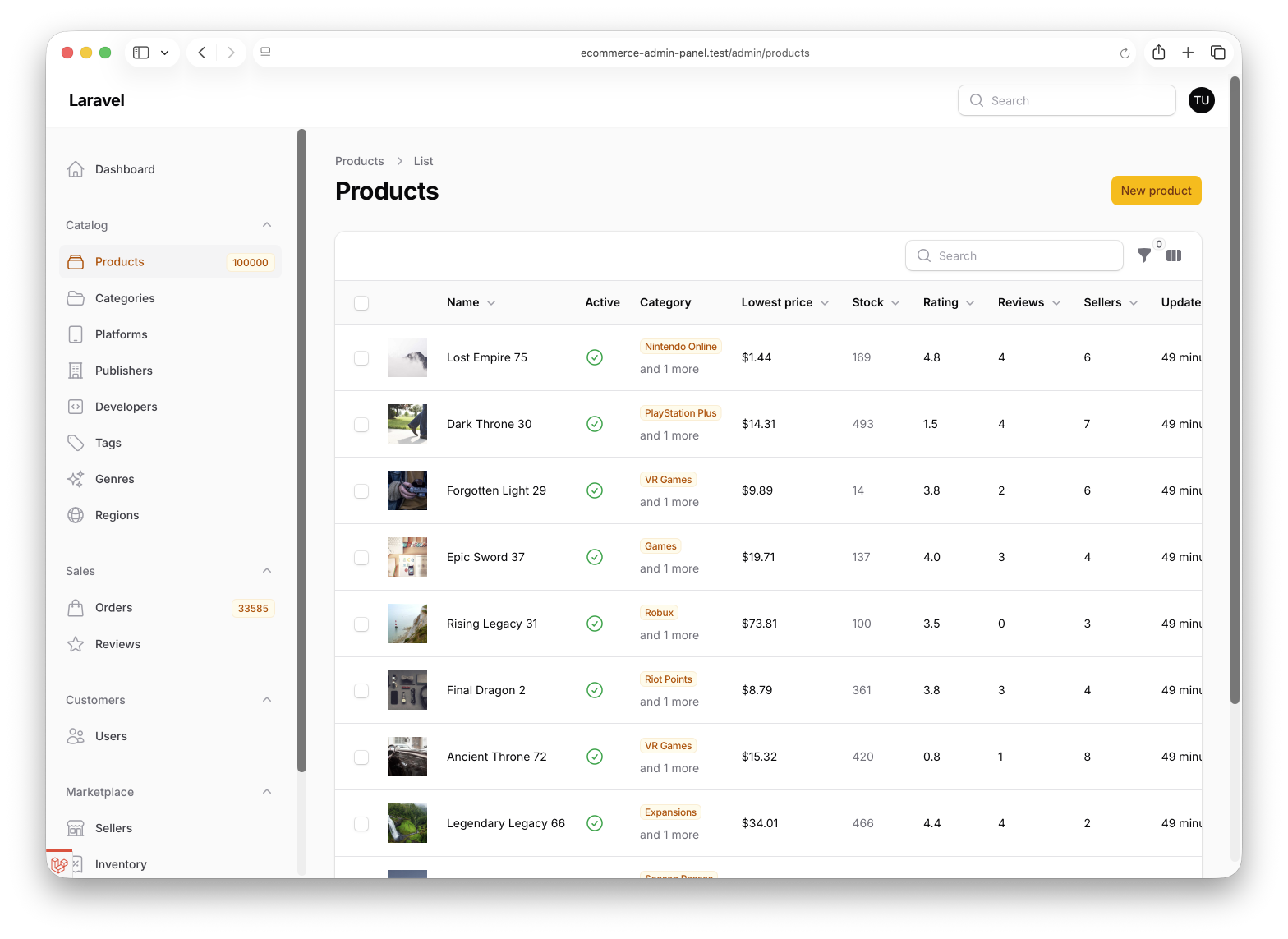
The key idea: Filament gives you a huge amount of admin UI quickly, but when the data gets serious you keep control. Expensive dashboard metrics are cached and computed as grouped aggregate queries, bulk operations run through a chunked service class, closure-based table columns eager-load their data explicitly, and navigation badges are cached so they don't run a COUNT(*) on every request.
The repository contains the complete Laravel + Filament project to demonstrate the functionality, including migrations/seeds for the demo data.
The Filament project is in the app/Filament folder.
Feel free to pick the parts that you actually need in your projects.
How to install
- Clone the repository with
git clone - Copy the
.env.examplefile to.envand edit database credentials there - Run
composer install - Run
php artisan key:generate - Run
php artisan storage:link - Run
php artisan migrate --seed(it seeds a large demo dataset, so this step takes a while) - Run
npm install&&npm run build - That's it: launch the URL
/adminand log in with credentials[email protected]andpassword
Screenshots
How It Works
The panel is organized around real operator workflows rather than tables. Each section below is one of those workflows: an executive dashboard, a large orders table, bulk fulfilment, rich detail pages, the product catalog, inventory control, a customer 360 view, and the scale techniques that hold it all together.
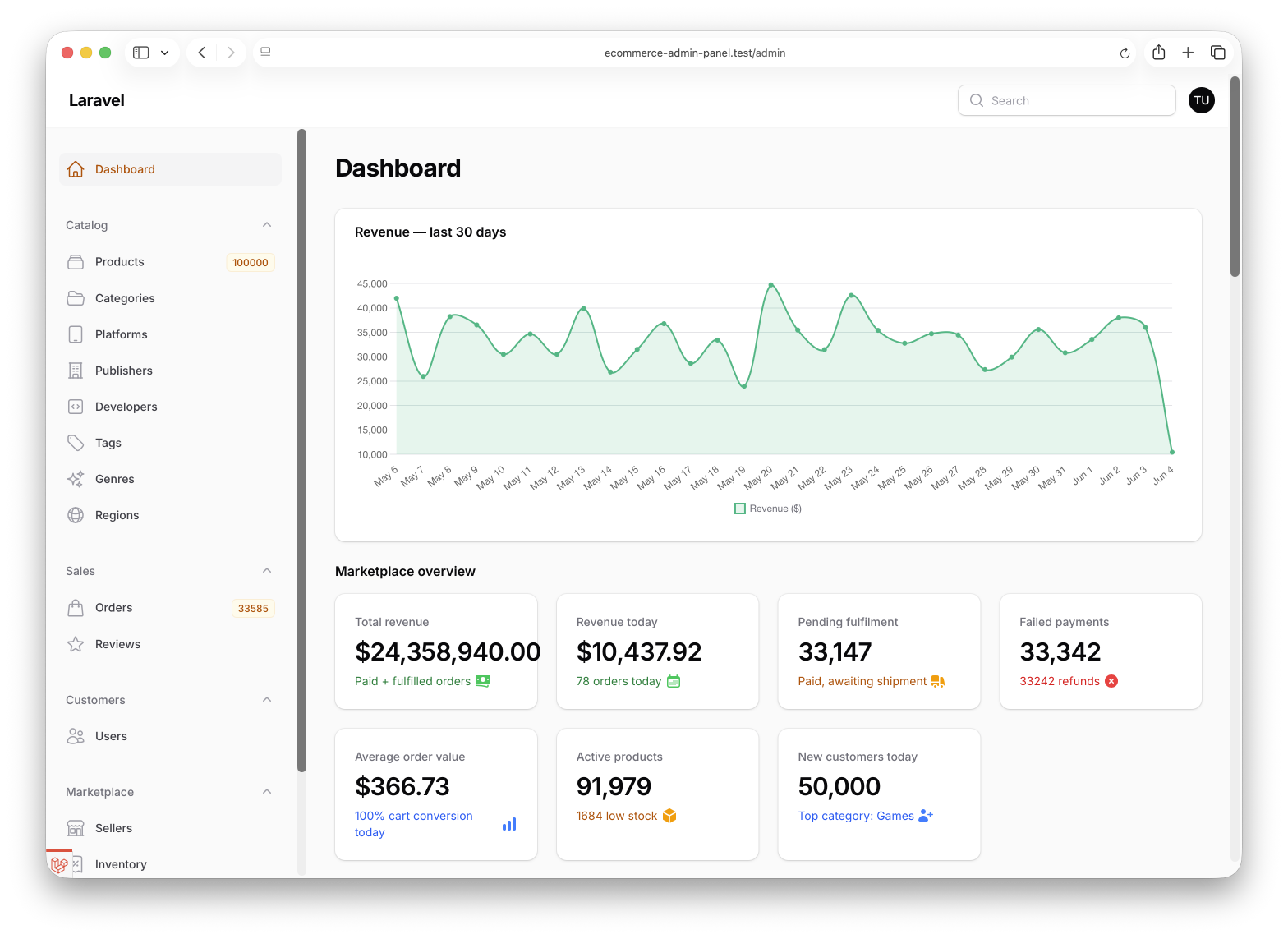
1. Dashboard — Cached Metrics as an Executive Overview
The dashboard is a StatsOverviewWidget whose every figure comes from a single cached metrics service. Stats double as navigation: clicking "Pending fulfilment" jumps straight into a pre-filtered orders tab.
app/Filament/Widgets/StatsOverview.php
protected function getStats(): array{ $metrics = DashboardMetrics::cached(); return [ Stat::make('Total revenue', '$'.number_format($metrics['revenue'], 2)) ->description('Paid + fulfilled orders') ->descriptionIcon(Heroicon::Banknotes) ->color('success') ->url(OrderResource::getUrl('index')), // ... Stat::make('Pending fulfilment', number_format($metrics['pending_fulfillment'])) ->description('Paid, awaiting shipment') ->descriptionIcon(Heroicon::Truck) ->color($metrics['pending_fulfillment'] > 0 ? 'warning' : 'gray') ->url(OrderResource::getUrl('index', ['tab' => 'fulfillment_queue'])), // ... ];}app/Services/DashboardMetrics.php
public static function cached(): array{ return Cache::remember( self::CACHE_KEY, now()->addSeconds(self::CACHE_SECONDS), fn (): array => self::compute(), );} public static function topProductsByRevenue(int $limit = 10): array{ $rows = DB::table('order_items') ->join('orders', 'orders.id', '=', 'order_items.order_id') ->whereIn('orders.status', OrderStatus::revenueQualifying()) ->where('orders.created_at', '>=', now()->subDays(30)) ->select('order_items.product_name', DB::raw('SUM(order_items.price * order_items.quantity) as revenue')) ->groupBy('order_items.product_name') ->orderByDesc('revenue') ->limit($limit) ->get(); return [ 'labels' => $rows->pluck('product_name')->all(), 'values' => $rows->pluck('revenue')->map(fn ($v) => (float) $v)->all(), ];}The key points:
DashboardMetrics::cached()wraps the whole metrics array inCache::rememberfor 60 seconds — the dashboard renders seven stats and six charts, and without caching every page load would fire dozens of aggregate queries against 200k orders->url(OrderResource::getUrl('index', ['tab' => 'fulfillment_queue']))turns a passive number into a control surface — the stat links to the exact tab an operator needs next, so the dashboard is a launchpad, not just a readout- Every chart helper computes in SQL —
SUM(...),AVG(...),GROUP BYrun in the database and return tiny result sets (10–30 rows), instead of pulling models into a collection and aggregating in PHP OrderStatus::revenueQualifying()centralizes the "what counts as revenue" rule (paid + fulfilled) in the enum, so every metric and chart shares one definition rather than copy-pasting awhereIn
2. Orders Table — Built for Operators, Not Just Browsing
The orders table is tuned for people who work tickets all day: snapshot search columns, real-workflow filters, status badges, copyable order numbers, toggleable columns, and a stable default sort that survives a 200k-row dataset.