
Filament Custom Table Design with ViewColumn
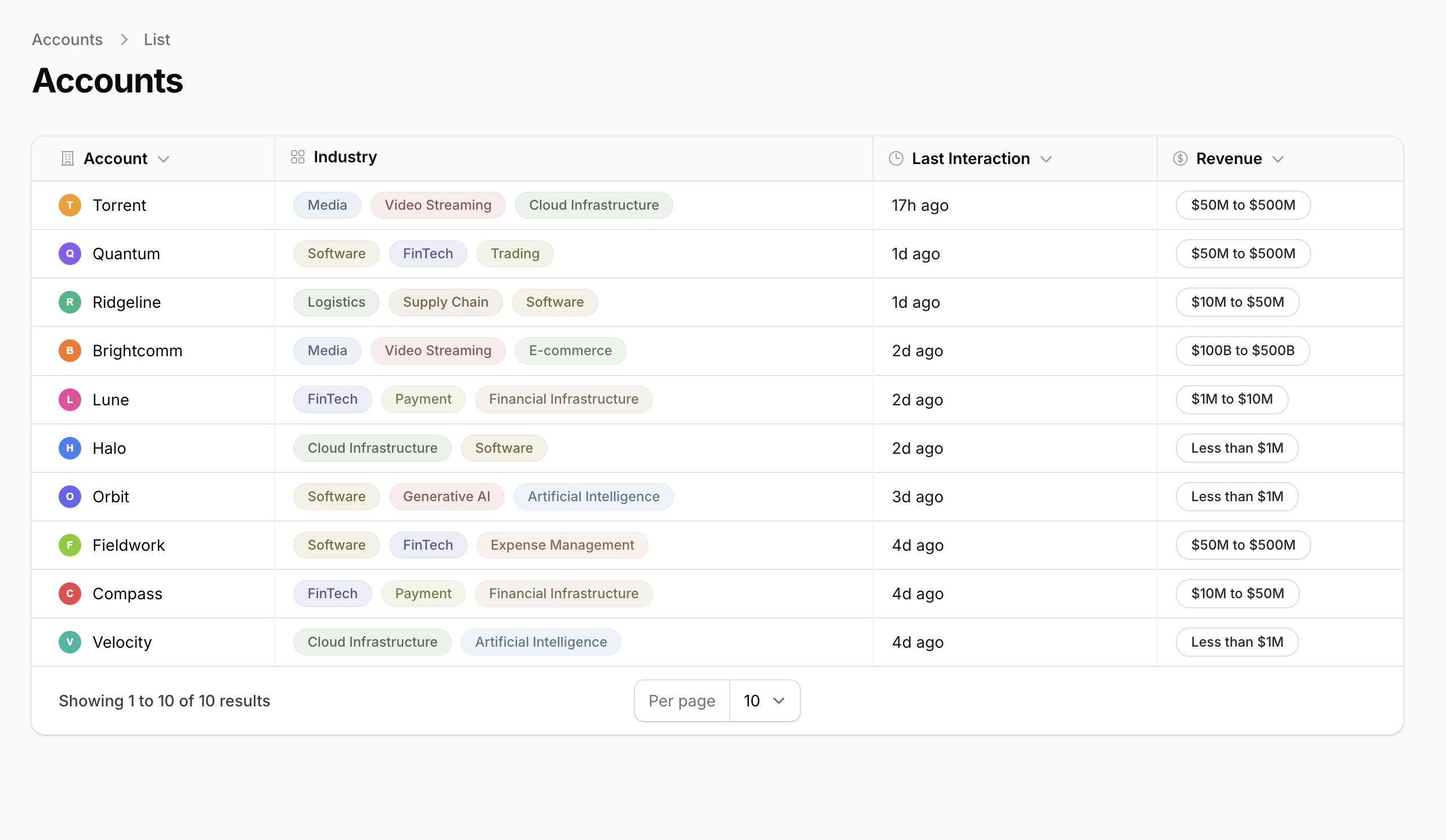
Filament 4/5Transform a default Filament table into a polished, product-like UI using ViewColumn with custom Blade views and components.
Get the Source Code:
Only This Example
One-time payment
 Sign in with GitHub to buy
Sign in first, then complete your $9 checkout.
FilamentExamples Membership
30-day money-back guarantee
How it works
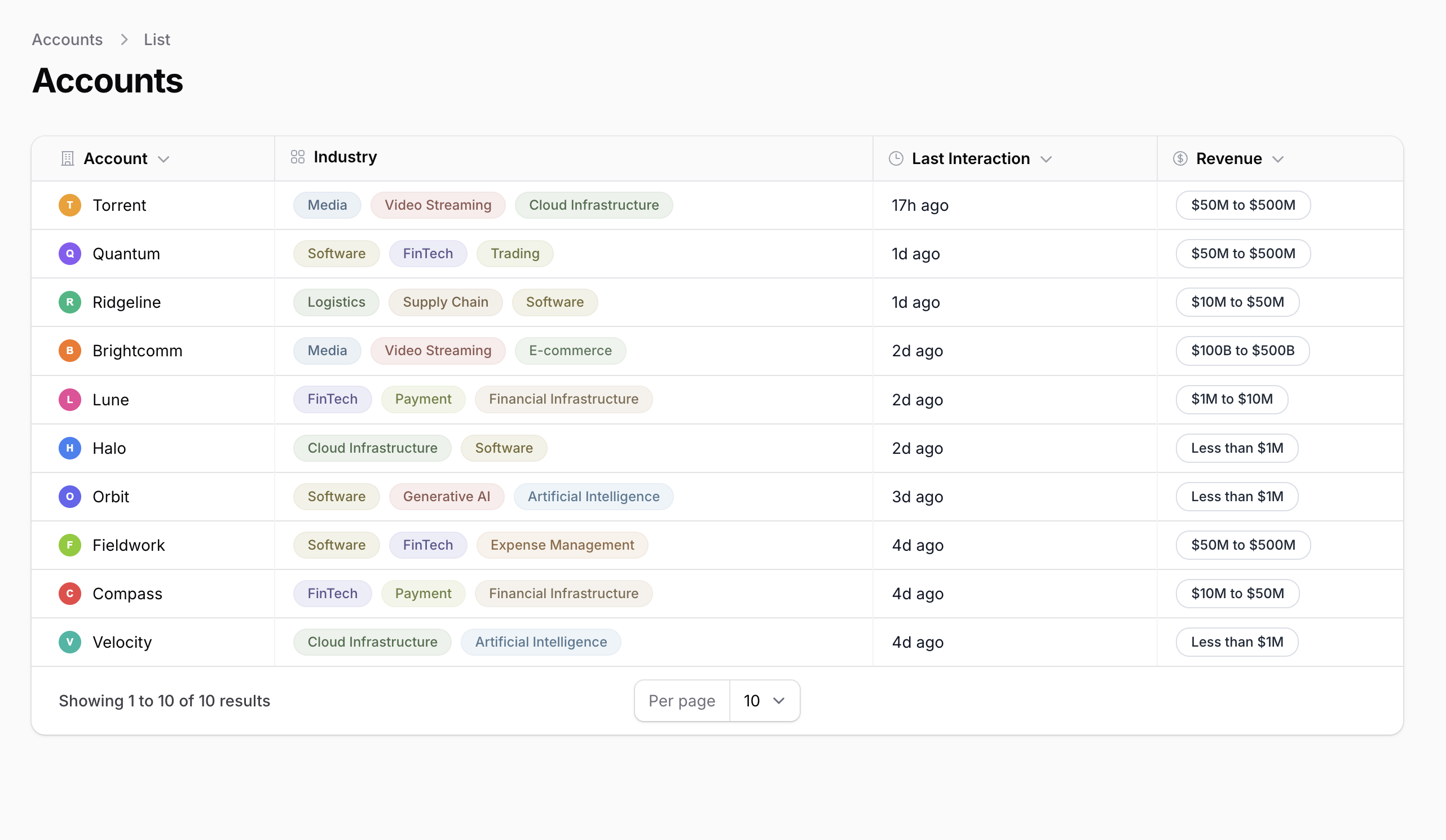
This project demonstrates how to customize the visual design of a Filament table using ViewColumn and custom Blade components. The result transforms a standard admin table into a polished, product-like accounts table with custom industry pills, revenue chips, merged logo+name cells, column dividers, and header icons.
The key idea: Filament still handles resource routing, sorting, Eloquent integration, and table structure. Only the presentation layer is customized, and only where the default primitives don't match the target design.
The repository contains the complete Laravel + Filament project to demonstrate the functionality, including migrations/seeds for the demo data.
How to Install
- Clone the repository with
git clone - Copy the
.env.examplefile to.envand edit database credentials there - Run
composer install - Run
php artisan key:generate - Run
php artisan storage:link - Run
php artisan migrate:fresh --seed(it has some seeded data for your testing) - That's it: launch the URL
/adminand log in with credentials[email protected]andpassword
Screenshot
How It Works
The project has two Models:
- Account — name, logo, revenue, last_interaction_at, and a many-to-many relationship with industries
- Industry — name, color (hex), and a many-to-many relationship with accounts
The Account model includes a revenueGroup() helper that buckets revenue into human-readable ranges like $1M to $10M or $100B to $500B.
Models
app/Models/Account.php
class Account extends Model{ use HasFactory; protected function casts(): array { return [ 'revenue' => 'decimal:2', 'last_interaction_at' => 'datetime', ]; } public function industries(): BelongsToMany { return $this->belongsToMany(Industry::class); } public function revenueGroup(): string { $revenue = (float) $this->revenue; return match (true) { $revenue >= 100_000_000_000 => '$100B to $500B', $revenue >= 50_000_000 => '$50M to $500M', $revenue >= 10_000_000 => '$10M to $50M', $revenue >= 1_000_000 => '$1M to $10M', default => 'Less than $1M', }; }}app/Models/Industry.php
class Industry extends Model{ use HasFactory; public function accounts(): BelongsToMany { return $this->belongsToMany(Account::class); }}The Table: All ViewColumns
The core of the customization is in the table class. Instead of using standard TextColumn or ImageColumn, every column uses ViewColumn with a custom Blade view. This is the key design decision: once the target...