
Filament: Custom Dashboard Widgets with FilaWidgets Package
Filament 4/5This project demonstrates how to build a multi-widget analytics dashboard powered by the laraveldaily/filawidgets package, with widgets like SparklineTableWidget, BreakdownWidget, HeatmapCalendarWidget, ProgressWidget, and CompletionRateWidget.
Get the Source Code:
Only This Example
One-time payment
 Sign in with GitHub to buy
Sign in first, then complete your $9 checkout.
FilamentExamples Membership
30-day money-back guarantee
How it works
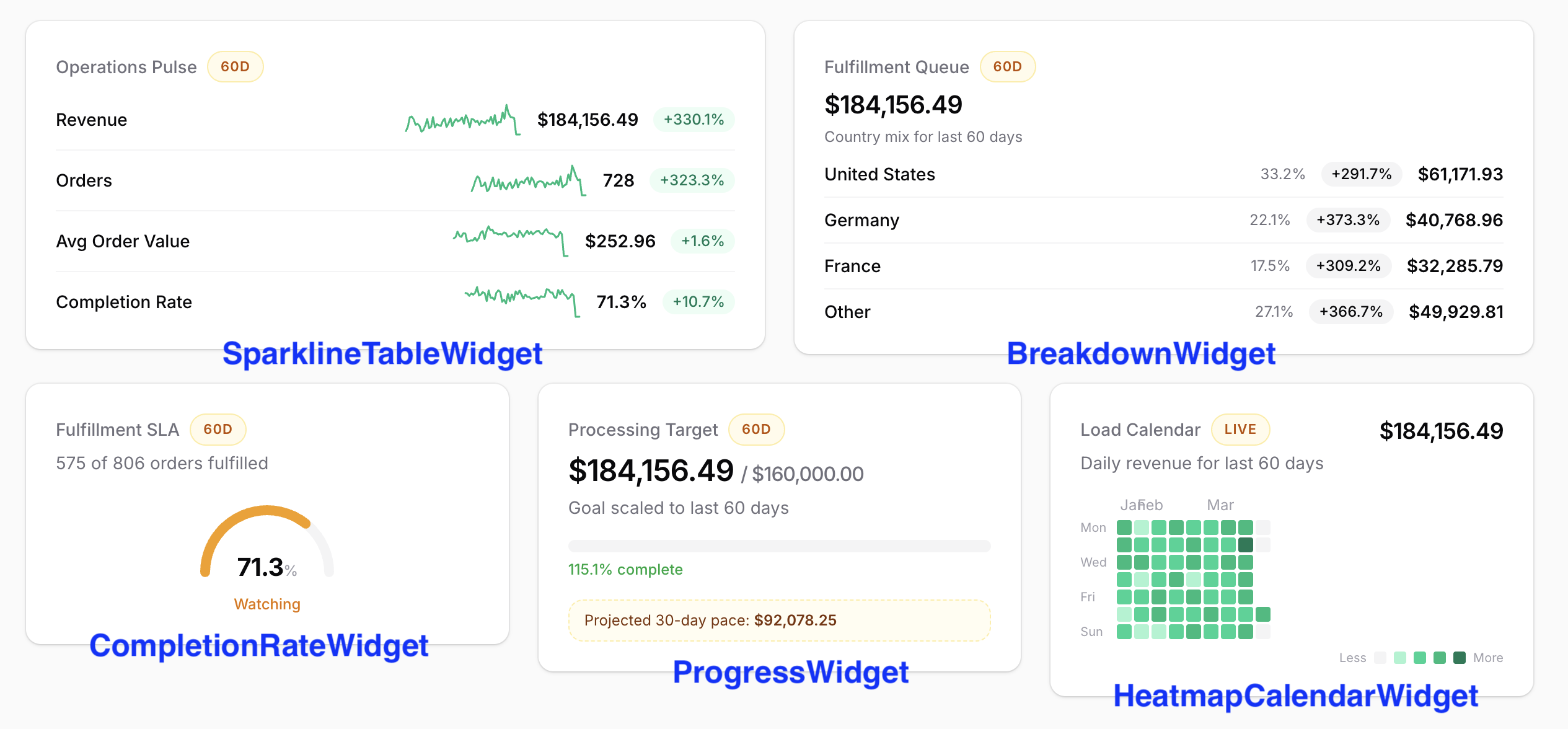
This project uses five widget types from the laraveldaily/filawidgets package — SparklineTableWidget, BreakdownWidget, HeatmapCalendarWidget, ProgressWidget, and CompletionRateWidget — organized into three dashboard presets with shared date-range filtering.
How to install
- Clone the repository with
git clone - Copy the
.env.examplefile to.envand edit database credentials there - Run
composer install - Run
php artisan key:generate - Run
php artisan storage:link - Run
php artisan migrate --seed(it has some seeded data for your testing) - That's it: launch the URL
/adminand log in with credentials[email protected]andpassword.
Screenshots
1. Dashboard Page — Presets and Filters
The dashboard extends Filament's BaseDashboard with HasFiltersForm to add two toggle-button filters: a preset selector (Revenue / Growth / Operations) and a date range selector (7 / 30 / 60 days). Each preset loads a different set of five widgets.
app/Filament/Pages/Dashboard.php
class Dashboard extends BaseDashboard{ use HasFiltersForm; public function getColumns(): int|array { return [ 'md' => 2, 'xl' => 6, ]; } public function filtersForm(Schema $schema): Schema { return $schema->components([ ToggleButtons::make('preset') ->default(DashboardPreset::Revenue->value) ->hiddenLabel() ->grouped() ->options(DashboardPreset::options()), ToggleButtons::make('range') ->default(DashboardDateRange::Last30Days->value) ->hiddenLabel() ->grouped() ->options(DashboardDateRange::options()), ]); } public function getWidgets(): array { return $this->getWidgetsForPreset(DashboardPreset::fromFilter($this->filters['preset'] ?? null)); } protected function getWidgetsForPreset(DashboardPreset $preset): array { return match ($preset) { DashboardPreset::Revenue => $this->revenueWidgets(), DashboardPreset::Growth => $this->growthWidgets(), DashboardPreset::Operations => $this->operationsWidgets(), }; } protected function revenueWidgets(): array { return [ RevenuePulseWidget::class, RevenueByRegionWidget::class, FulfillmentRateWidget::class, RevenueGoalWidget::class, DailyRevenueWidget::class, ]; } // growthWidgets() and operationsWidgets() follow the same pattern}The key points:
- The grid uses a responsive 2-column / 6-column layout via
getColumns() DashboardPresetandDashboardDateRangeare PHP enums that provide labels, options, and date calculations- Each preset returns a curated list of five widget classes
- The preset filter dynamically swaps all widgets on the page without a full reload
2. SparklineTableWidget — Metrics with Inline Sparklines
The RevenuePulseWidget shows four rows — Revenue, Orders, Avg Order Value, and Completion Rate — each with a current value, period-over-period comparison, and a daily sparkline chart. All data classes come from...