
AI-Powered Free-Form Text Search in Filament Table
Filament 4/5A Filament resource with a natural-language search action that accepts a plain-English sentence, runs it through a Laravel AI agent with structured output, and applies the result directly to the table's existing filters.
Get the Source Code:
Only This Example
One-time payment
 Sign in with GitHub to buy
Sign in first, then complete your $9 checkout.
FilamentExamples Membership
30-day money-back guarantee
How it works
AI-Powered Participant Search with Filament and Laravel AI
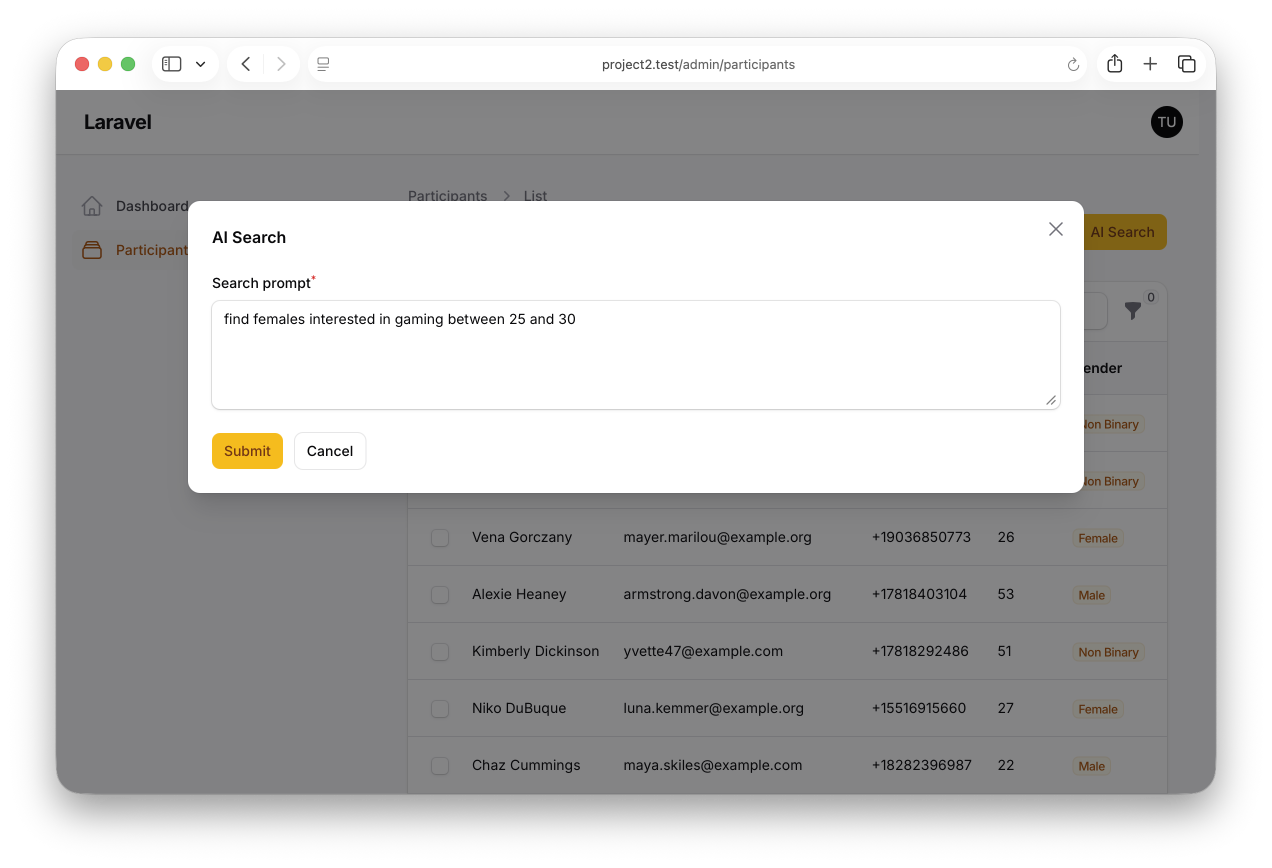
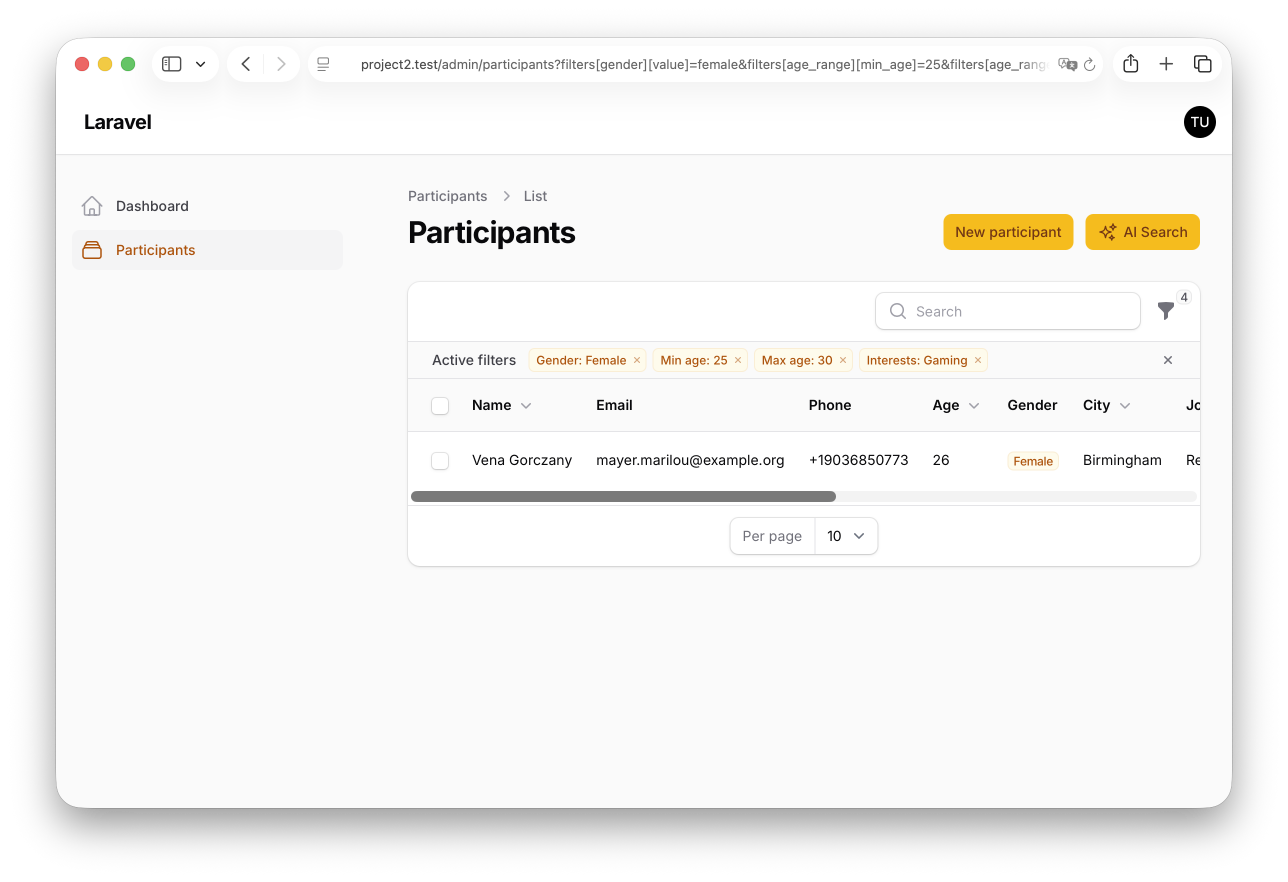
This project demonstrates how to build a natural-language search action for a Filament resource. Instead of exposing a dozen filters and hoping users find them, a single header action accepts a sentence like "Find women interested in technology who are 25-35 and living in London", runs it through a Laravel\Ai agent, and applies the result to the resource table's existing filters — no bespoke query layer, no parallel search pipeline.
The repository contains the complete Laravel + Filament project, including migrations, factories, and a seeder that generates demo data.
Feel free to pick the parts that you actually need in your projects.
How to install
- Clone the repository with
git clone - Copy the
.env.examplefile to.envand edit database credentials there - Set
OPENAI_API_KEYin your.env(or configure any other provider inconfig/ai.phpand updateAI_DEFAULTaccordingly) — the AI Search button is disabled until a key is present - Run
composer install - Run
php artisan key:generate - Run
php artisan storage:link - Run
php artisan migrate --seed(it has some seeded data for your testing) - That's it: launch the URL
/adminand log in with credentials[email protected]andpassword.
Screenshots
How It Works
This project has three moving parts: a Laravel\Ai agent that converts natural language into structured filter values, a Filament header action that calls the agent and applies the result, and a resource table whose filters are the single source of truth for both manual and AI-driven searches.
1. The ParticipantSearchAgent — Natural Language to Structured Filters
The agent implements Laravel\Ai's Agent and HasStructuredOutput contracts, so its output is a typed JSON object instead of free text. The schema keys are named to match the filter keys on the resource table exactly — that one-to-one mapping is what lets the rest of the pipeline stay boring.
app/Ai/Agents/ParticipantSearchAgent.php
#[UseCheapestModel]class ParticipantSearchAgent implements Agent, HasStructuredOutput{ use Promptable; public function instructions(): string { $genders = implode(', ', array_column(Gender::cases(), 'value')); $cities = implode(', ', array_column(City::cases(), 'value')); $interests = implode(', ', array_column(Interest::cases(), 'value')); return <<<PROMPT You extract participant search filters from a natural-language admin request. Allowed genders: {$genders}. Allowed cities: {$cities}. Allowed interests: {$interests}. Rules: - Use null for unknown single-value fields (gender, city, min_age, max_age). - Use an empty array for unknown list fields (interests, job_title_keywords). - Never invent values. Map synonyms to the closest allowed value; if nothing fits, return null / []. - Ages must be between 18 and 65 inclusive. - job_title_keywords should be short lowercase words or phrases pulled from the request. PROMPT; } public function schema(JsonSchema $schema): array { return [ 'gender' => $schema->string()->enum(Gender::class)->required()->nullable(), 'min_age' => $schema->integer()->min(18)->max(65)->required()->nullable(), 'max_age' => $schema->integer()->min(18)->max(65)->required()->nullable(), 'city' => $schema->string()->enum(City::class)->required()->nullable(), 'interests' => $schema->array()->items( $schema->string()->enum(Interest::class) )->required(), 'job_title_keywords' => $schema->array()->items( $schema->string()->min(2)->max(50) )->required(), ]; }}The key points:
#[UseCheapestModel]— this is a trivial extraction task, so the agent is routed to the cheapest model the default provider exposes. No need to burn a frontier model to parse one sentenceHasStructuredOutput+schema()— the return shape is a typed JSON object keyed bygender,min_age,max_age,city,interests, andjob_title_keywords— the exact filter names theParticipantsTablealready uses- Enum-bound string fields —
->enum(Gender::class),->enum(City::class),->enum(Interest::class)mean the model can only return values that already exist inApp\Enums\{Gender,City,Interest}. This makes the downstream validation pass almost a formality instructions()inlines the allowed values into the prompt and spells out the null-vs-empty-array contract, so the model never invents synonyms or guesses when the request is ambiguousPromptabletrait — lets the caller do the whole call in one line:(new ParticipantSearchAgent)->prompt($text)->toArray()
2. The aiSearch Header Action — Prompt, Validate, Apply
The action lives on the ListParticipants page as a header action. It opens a small form with a single textarea, calls the agent, validates the output a second time, and then writes the normalized values into the table's filter state.